<?xml version="1.0" encoding="utf-8"?><feed xmlns="http://www.w3.org/2005/Atom" ><generator uri="https://jekyllrb.com/" version="4.4.1">Jekyll</generator><link href="https://www.counselplanner.app/feed.xml" rel="self" type="application/atom+xml" /><link href="https://www.counselplanner.app/" rel="alternate" type="text/html" /><updated>2026-05-26T21:01:19+00:00</updated><id>https://www.counselplanner.app/feed.xml</id><title type="html">Agenda dell’Avvocato</title><subtitle>Elegante, veloce, intuitiva. La migliore Agenda Legale su iPad e iPhone con sincronizzazione in Cloud.</subtitle><entry><title type="html">The New Counsel Planner</title><link href="https://www.counselplanner.app/blog/what-s-new/counsel-planner-26-the-new-version/" rel="alternate" type="text/html" title="The New Counsel Planner" /><published>2025-05-30T00:00:00+00:00</published><updated>2025-05-30T00:00:00+00:00</updated><id>https://www.counselplanner.app/blog/what-s-new/counsel-planner-26-the-new-version</id><content type="html" xml:base="https://www.counselplanner.app/blog/what-s-new/counsel-planner-26-the-new-version/"><![CDATA[<p>On 4 March 2012, Agenda dell’Avvocato launched on the App Store. Since then, thousands of lawyers have used it every day to manage hearings, deadlines and case files — first on iPad, then on iPhone too.</p>

<p>Fourteen years is a long time. The app has received continuous updates, new features, improvements. But beneath the surface, the technology it was built on was ageing. To the point where adding something new — sync between devices, artificial intelligence, a modern interface — had become impossible without starting from scratch.</p>

<p>So we started from scratch.</p>

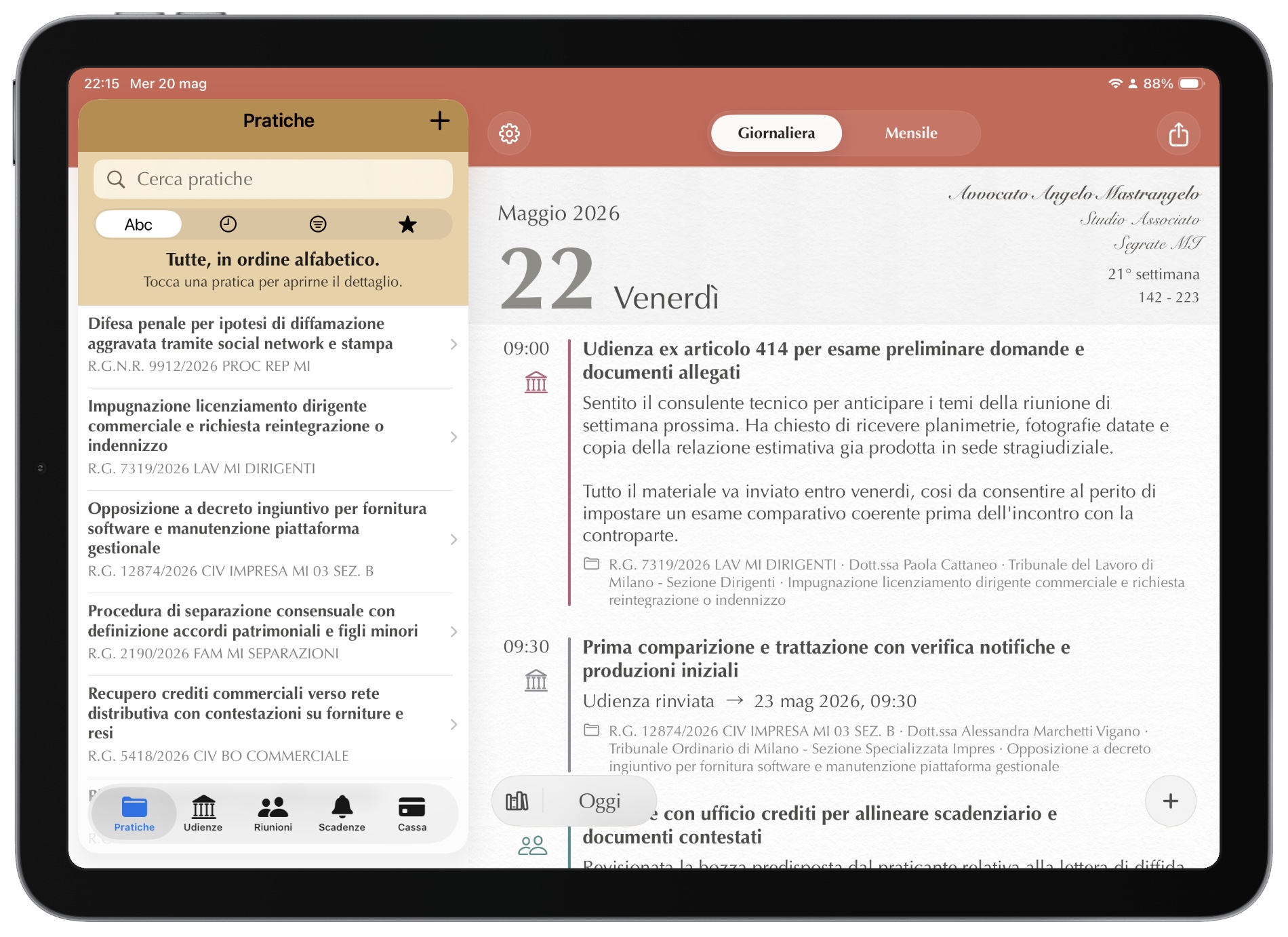
<p><img src="/assets/it/img/blog/novita/main-landscape_framed.jpg" alt="Counsel Planner on iPad and iPhone" /></p>

<h2 id="familiar-as-ever-new-inside">Familiar as ever, new inside</h2>

<p>The new Counsel Planner keeps the same way of working: cases, hearings, deadlines, the archive. Nothing has been moved for the sake of change.</p>

<p>What has changed is in addition to what you already know. The app is beautiful, faster, more responsive, more stable. And it can now do things that were previously impossible — Apple Intelligence being the prime example.</p>

<h2 id="one-single-app-for-ipad-and-iphone">One single app for iPad and iPhone</h2>

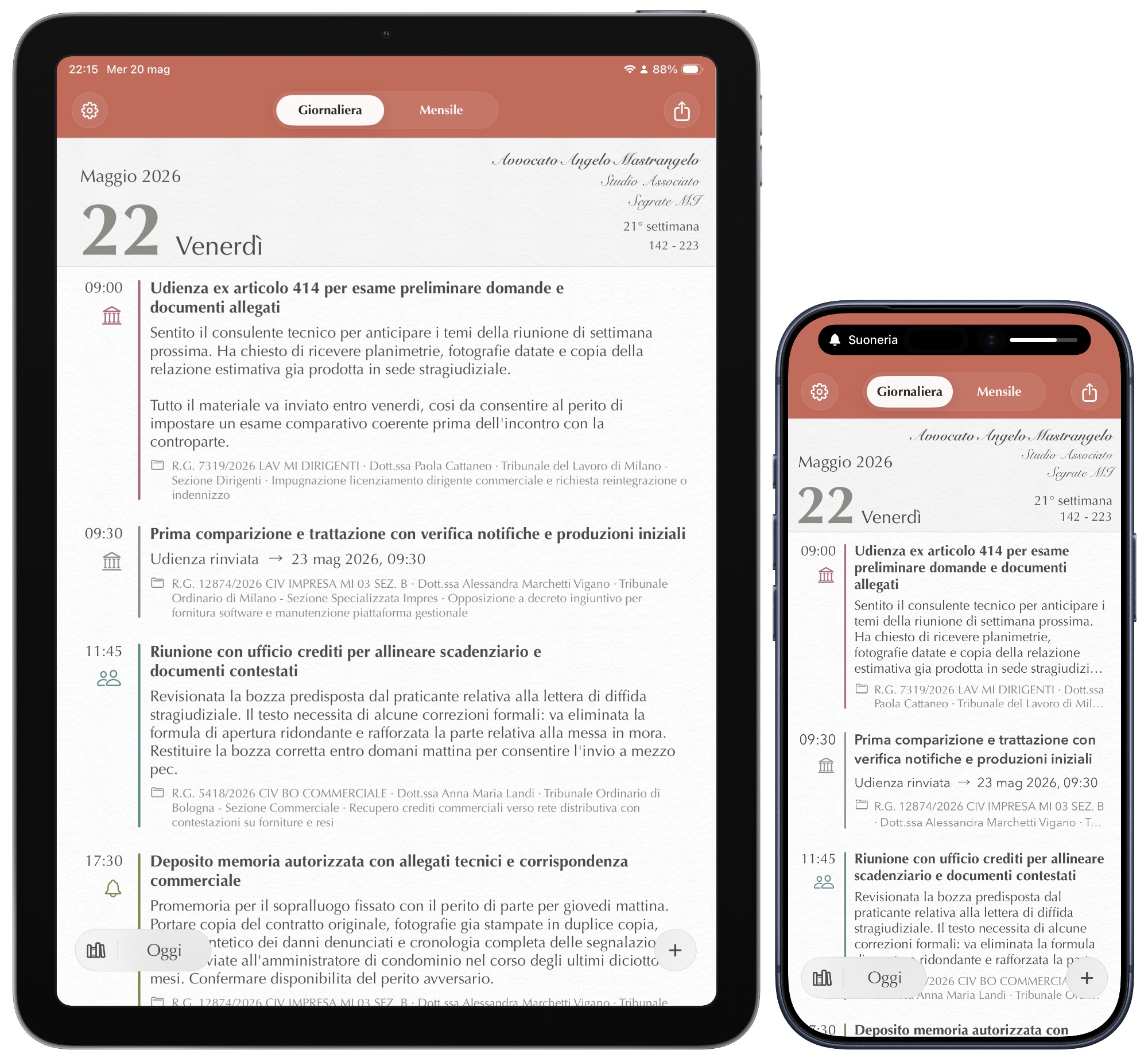
<p>Before, there were two separate apps — one for iPad, one for iPhone. Now there is just one, universal, that works on both devices with the same archive and the same subscription.</p>

<p>On iPad the archive is always visible on the side. On iPhone everything is reachable with a gesture. The interface adapts on its own, without you having to do anything.</p>

<p><img src="/assets/it/img/blog/novita/devices.jpg" alt="Counsel Planner on iPad and iPhone" /></p>

<h2 id="your-data-on-all-your-devices-automatically">Your data on all your devices, automatically</h2>

<p>The new app syncs via iCloud — the same space you already use for photos, documents and contacts. Data travels encrypted between your devices and only you can read it.</p>

<p>Add a hearing on your iPad at the office and find it on your iPhone when you leave. Without doing a thing. An up-to-date copy is always saved on the device, so you’ll always have access even without an internet connection.</p>

<h2 id="apple-intelligence-in-the-notes-editor">Apple Intelligence in the notes editor</h2>

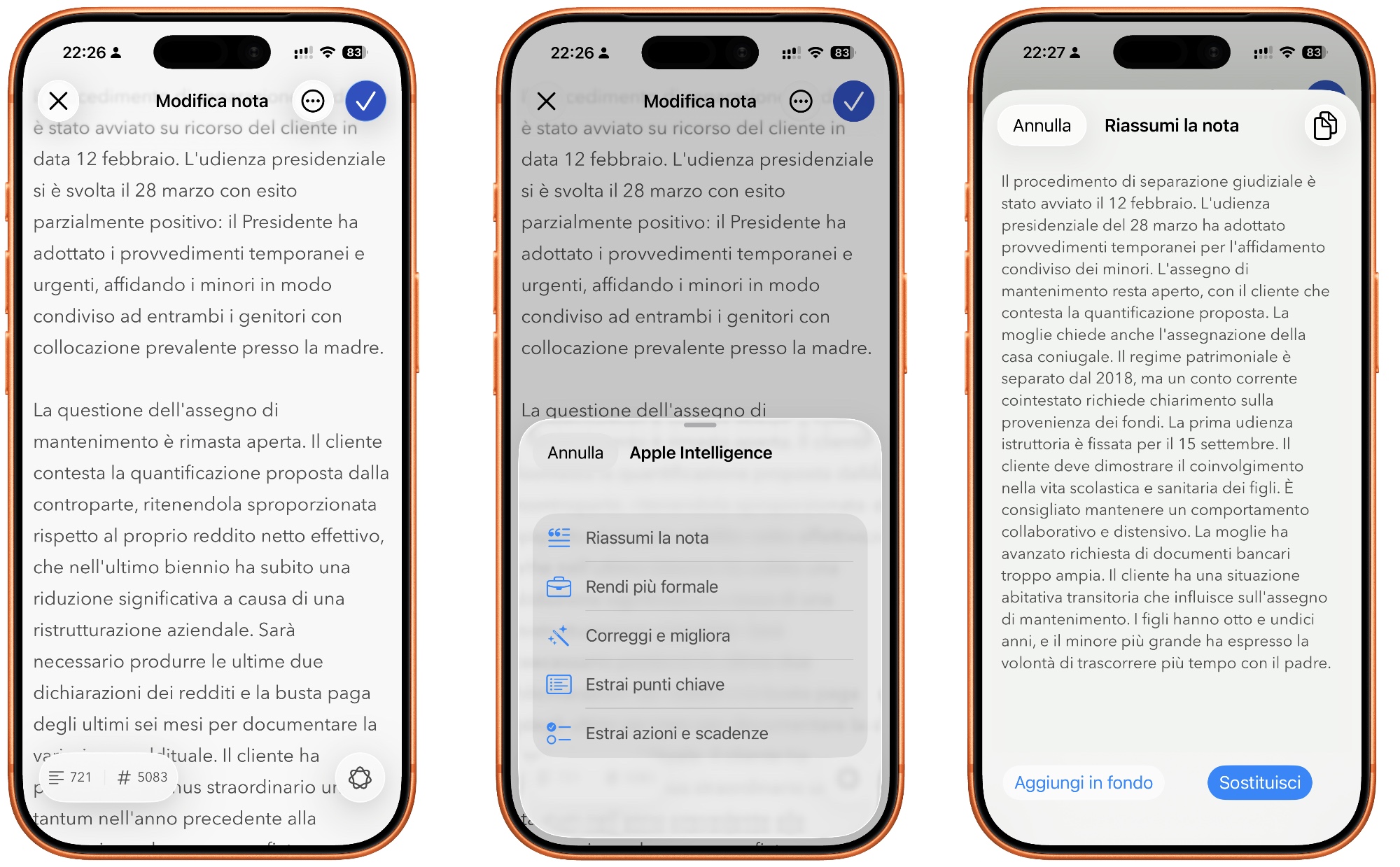
<p>If you have a recent iPhone or iPad, you can use Apple Intelligence directly in the notes editor. Summarise a long text, rephrase a note, correct a draft — all without leaving the app, without copying and pasting, without opening other tools.</p>

<p>Even more importantly, without leaving your device. Apple Intelligence runs on your iPhone or iPad and does not share your text with a server the way many other AI tools do. Here too, privacy is guaranteed “by design” by Apple.</p>

<p><img src="/assets/it/img/blog/novita/apple-intelligence_framed.jpg" alt="Counsel Planner on iPad and iPhone" /></p>

<h2 id="a-word-on-migration">A word on migration</h2>

<p>We know that switching apps is never simple, and that data accumulated over time is substantial and valuable. Unfortunately the technological gap between the old and new version does not allow an automatic archive migration.</p>

<p>The current version will remain available on the App Store for a while longer, and local data will stay on your devices forever — nothing disappears. You can consult it and, if you decide to, move it gradually into the new archive. Look on the bright side: it’s a good opportunity to tidy up and get rid of data you no longer need.</p>

<p>To make the transition easier, we decided to make the new app free of charge. You can try it with a preloaded sample archive: six realistic cases with hearings, deadlines and notes, letting you explore every feature before entering your own data.</p>

<h2 id="how-much-does-it-cost">How much does it cost</h2>

<p>The new Counsel Planner is free to download, on iPhone and on iPad.</p>

<p>To create new content — cases, hearings, notes — a subscription via the App Store is required. The cost is <strong>the price of a coffee a month</strong>. The first month is free, no upfront payment and you can cancel whenever you want. If you decide to cancel your subscription one day, the app stays active and you can continue to browse and edit your saved data forever.</p>

<p>Those who already use the app every day know how much time it saves. Those discovering it now have a month to find out.</p>

<hr />

<p><em>In the next articles we’ll look at how the agenda works, how to organise cases, how to set up sync and how to use Apple Intelligence in everyday work.</em></p>]]></content><author><name>Staff</name></author><category term="What&apos;s New" /><category term="26.0" /><summary type="html"><![CDATA[Fourteen years on, the app you know has been completely rebuilt. Same familiar feel, new possibilities. Free on iPhone and iPad.]]></summary></entry><entry><title type="html">Nuova Agenda dell’Avvocato</title><link href="https://www.counselplanner.app/blog/novit%C3%A0/agenda-avvocato-26-la-nuova-versione/" rel="alternate" type="text/html" title="Nuova Agenda dell’Avvocato" /><published>2025-05-30T00:00:00+00:00</published><updated>2025-05-30T00:00:00+00:00</updated><id>https://www.counselplanner.app/blog/novit%C3%A0/agenda-avvocato-26-la-nuova-versione</id><content type="html" xml:base="https://www.counselplanner.app/blog/novit%C3%A0/agenda-avvocato-26-la-nuova-versione/"><![CDATA[<p>Il 4 marzo 2012 Agenda dell’Avvocato arrivava sull’App Store. Da allora migliaia di avvocati la usano ogni giorno per gestire udienze, scadenze e fascicoli — su iPad prima, poi anche su iPhone.</p>

<p>Quattordici anni sono tanti. L’app ha ricevuto aggiornamenti continui, nuove funzioni, miglioramenti. Ma sotto la superficie, la tecnologia con cui era stata costruita invecchiava. Fino al punto in cui aggiungere qualcosa di nuovo — la sincronizzazione tra dispositivi, l’intelligenza artificiale, un’interfaccia moderna — era diventato impossibile senza ripartire da zero.</p>

<p>Quindi siamo ripartiti da zero.</p>

<p><img src="/assets/it/img/blog/novita/main-landscape_framed.jpg" alt="Agenda dell'Avvocato su iPad e iPhone" /></p>

<h2 id="familiare-come-sempre-nuova-dentro">Familiare come sempre, nuova dentro</h2>

<p>La nuova Agenda dell’Avvocato mantiene il modo di lavorare: le pratiche, le udienze, le scadenze, lo schedario. Niente è stato spostato per il gusto di cambiare.</p>

<p>Quello che è cambiato è in aggiunta a quello che conosci già. L’app è bellissima, più veloce, più reattiva, più stabile. E adesso può fare cose che prima erano impossibili, un esempio su tutti: Apple Intelligence!</p>

<h2 id="ununica-app-per-ipad-e-iphone">Un’unica app per iPad e iPhone</h2>

<p>Prima esistevano due app separate — una per iPad, una per iPhone. Adesso ce n’è una sola, universale, che funziona su entrambi i dispositivi con lo stesso archivio e lo stesso abbonamento.</p>

<p>Su iPad lo schedario è sempre visibile a lato. Su iPhone tutto è raggiungibile con un gesto. L’interfaccia si adatta da sola, senza che tu debba fare nulla.</p>

<p><img src="/assets/it/img/blog/novita/devices.jpg" alt="Agenda dell'Avvocato su iPad e iPhone" /></p>

<h2 id="i-tuoi-dati-su-tutti-i-dispositivi-in-automatico">I tuoi dati su tutti i dispositivi, in automatico</h2>

<p>La nuova app si sincronizza tramite iCloud — lo stesso spazio che usi già per le foto, i documenti e i contatti. I dati viaggiano cifrati tra i tuoi dispositivi e solo tu puoi leggerli.</p>

<p>Aggiungi un’udienza sull’iPad in studio e la trovi sull’iPhone quando esci. Senza fare niente. Una copia aggiornata è sempre salvata sul dispositivo, quindi l’avrai sempre a disposizione anche in assenza di connessione internet.</p>

<h2 id="apple-intelligence-nelleditor-degli-appunti">Apple Intelligence nell’editor degli appunti</h2>

<p>Se hai un iPhone o iPad recente, puoi usare Apple Intelligence direttamente nell’editor degli appunti. Riepilogare un testo lungo, riformulare una nota, correggere una bozza: tutto senza uscire dall’app, senza copiare e incollare, senza aprire altri strumenti.</p>

<p>Cosa ancora più importante, senza uscire dal tuo dispositivo! Apple Intelligence funziona nel tuoi iPhone o iPad e non condivide il testo con un server come molte altre AI fanno. Anche in questo caso la privacy è garantita “by design” da Apple.</p>

<p><img src="/assets/it/img/blog/novita/apple-intelligence_framed.jpg" alt="Agenda dell'Avvocato su iPad e iPhone" /></p>

<h2 id="una-parola-sulla-migrazione">Una parola sulla migrazione</h2>

<p>Sappiamo che cambiare app non è mai semplice, e che i dati accumulati nel tempo sono molti ed hanno un valore. Purtroppo la differenza tecnologica tra la vecchia e la nuova versione non permette una migrazione automatica dell’archivio.</p>

<p>La versione attuale rimarrà disponibile sull’App Store ancora per un periodo, e i dati locali resteranno per sempre sui tuoi dispositivi — non sparisce nulla. Potrai consultarli e se decidi potrai spostarli gradualmente nel nuovo archivio. Guarda il lato positivo: è una buona occasione per fare pulizia e liberarti dei dati non più importanti.</p>

<p>Per facilitarti nel passaggio, abbiamo deciso azzerare il costo della nuova applicazione. Potrai provarla con un archivio di esempio precaricato: sei pratiche realistiche con udienze, scadenze e note, con cui esplorare ogni funzione prima di inserire i tuoi dati veri.</p>

<h2 id="quanto-costa">Quanto costa</h2>

<p>La nuova Agenda dell’Avvocato si scarica gratis, su iPhone e su iPad.</p>

<p>Per creare nuovi contenuti — pratiche, udienze, appunti — è necessaria una sottoscrizione tramite App Store. Il costo è quello di <strong>un caffè al mese</strong>. Il primo mese è gratuito, nessun pagamento in anticipato e lo interrompi quando vuoi. Se un giorno deciderai di interrompere la sottoscrizione, l’app resterà attiva e potrai continuare a consultare e modificare i dati salvati per sempre.</p>

<p>Chi già usa l’app ogni giorno sa quanto vale il tempo risparmiato. Chi la scopre adesso ha un mese per valutarlo.</p>

<hr />

<p><em>Nei prossimi articoli vedremo come funziona l’agenda, come organizzare le pratiche, come configurare la sincronizzazione e come sfruttare Apple Intelligence nel lavoro quotidiano.</em></p>]]></content><author><name>Staff</name></author><category term="Novità" /><category term="26.0" /><summary type="html"><![CDATA[Quattordici anni dopo, l'app che conosci si rinnova completamente. Stessa familiarità, nuove possibilità. Gratis su iPhone e iPad.]]></summary></entry></feed>